
MyRISK Trace · for IT and security
Deploying MyRISK Trace
Somebody in your organisation wants to put a decision that matters into Trace, and you have to approve how it runs. It covers the two ways Trace runs, what the optional container needs from your environment, how it connects to MyRISK, what crosses the boundary in each direction, what you provide, what MyRISK provides, and what your security review can ask for.
Two things to settle first
- Trace is integrated with MyRISK. The customer-hosted gateway is optional. You can manage Trace decisions directly in MyRISK without operating a gateway at all.
- A standalone gateway with no MyRISK integration is not a supported operating model. If that is what you need, Trace is not the right product and we would rather say so now.
The two ways to run Trace
The gateway is for organisations that need local operation, a local API and interface, integration with internal systems, high-frequency decision triage, queued delivery, or local event monitoring. If none of those apply, you do not need one.
One authority at a time
To protect the authority and auditability of decisions, MyRISK and the gateway do not operate as competing decision editors.
- While MyRISK holds authority, decisions are managed in MyRISK.
- When a gateway is activated, supported existing decisions are transferred to it, and the MyRISK decision-management interface becomes read-only.
- The gateway is then the authoritative place for decision changes, and it continues to send the resulting records and audit events to MyRISK.
Authority transfers only after the initial transfer has completed successfully. The activation process is built so that an empty gateway cannot silently overwrite existing decisions, and so that two conflicting sets of authoritative records cannot be combined.
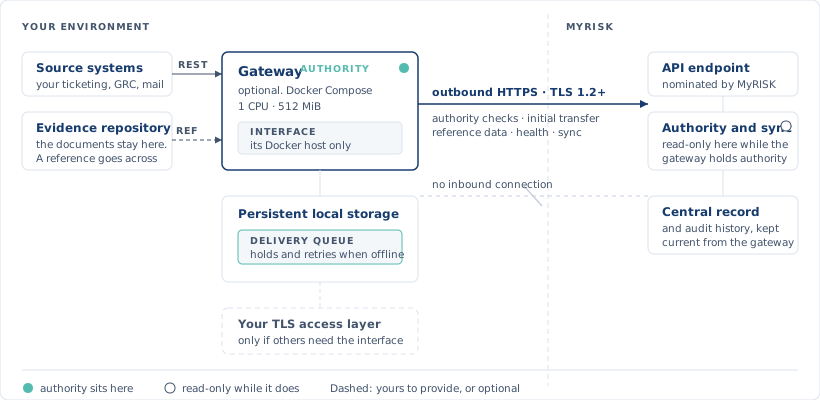
What the gateway needs
Runtime. Docker Engine with Docker Compose. Kubernetes and Podman are optional deployment targets.
Size. The standard configuration limits the gateway to one CPU and 512 MiB of memory. It needs persistent storage for its local database, and an appropriate location for backups and future upgrades. Disk depends on how many decisions, events, audit entries and evidence records you retain locally.
Host. A dedicated physical host is not normally required. The gateway can run on existing infrastructure that meets the runtime, storage and network requirements.
Network. Outbound HTTPS to the nominated MyRISK API endpoint. Production communication requires TLS 1.2 or later. Standard enterprise HTTP proxy settings are supported; if you use TLS inspection, your inspection certificate authority must be trusted by the gateway environment.
Local interface. By default the gateway interface is reachable only from its Docker host. If other devices need it, you publish it through an approved access layer — an authenticated TLS reverse proxy, for example.
Credentials
The gateway authenticates to MyRISK with credentials issued by MyRISK, transmitted only over HTTPS. In the standard deployment the secret is mounted using Docker's secret mechanism, not embedded in the image and not kept with ordinary configuration.
Rotation is a controlled, four-step process: MyRISK issues or activates a replacement; you update the gateway secret; the gateway is recreated or restarted; the previous credential is revoked.
Integration
What is implemented today is the MyRISK platform, and the gateway's own interface and REST API. Those interfaces carry decision records, evidence metadata and declarations, approvals, attestations, evaluations, binding, source events and revocation activity. Other systems integrate by sending appropriately structured information to the REST API.
There are no universal product connectors. Ticketing, ITSM, email, document storage and cloud platform connectors are not included as standard. Any such connector is separately scoped and tested for your environment before it is described as supported.
The mechanism is REST over HTTP or HTTPS. Your systems submit decisions, evidence records, approvals, attestations and source events to the gateway; the gateway makes outbound calls to MyRISK for authority management, initial decision transfer, reference data and synchronisation. Scheduled integrations, webhooks and product-specific adapters can be built around these APIs — by MyRISK, by you, or by an implementation partner, depending on the agreed scope.
What leaves your environment
The gateway sends authoritative decision records and material lifecycle events to MyRISK, so the central record and audit history stay current.
Evidence does not have to leave. You can supply a reference, a link, a cryptographic hash, descriptive metadata or an authorised user's declaration instead of the source document, and the material itself stays in your repository or security boundary.
The gateway is not a general-purpose document-transfer service. It is designed to synchronise decision information and evidence metadata. Any deployment that requires raw evidence content to leave your environment is explicitly designed, approved, and included in the relevant privacy and security assessments.
When the connection drops
Decision updates go into a persistent queue and are delivered automatically; an unsuccessful delivery is retained and retried. If MyRISK is unreachable for a day, authorised local activity continues and the updates queue.
Queued information is not treated as synchronised until MyRISK has accepted it.
MyRISK also supplies the gateway with platform reference data, and the gateway periodically checks its authority state and sends health information back.
What you provide
The gateway
- A supported host capable of running Docker and Docker Compose.
- Sufficient CPU, memory and persistent disk capacity.
- A backup location and appropriate recovery arrangements.
- Outbound HTTPS access to the nominated MyRISK endpoint.
- Proxy details and trusted certificates, where applicable.
- An authenticated TLS access layer if the gateway will be used remotely.
- Appropriate access controls for the gateway host and local interface.
- Decisions on local backup, retention and storage encryption.
- Secure storage for issued credentials.
Everything else
- Access to any of your systems included in the integration.
- A named technical contact for infrastructure and integration matters.
- Representative test decisions, evidence references and events.
- Security and platform approval for the deployment.
What MyRISK provides
Subject to the agreed implementation and support scope:
- The versioned gateway software and complete release package.
- A repeatable container build process, and a versioned offline container image.
- Checksums for release verification, and container-signing and verification material for signed releases.
- Hardened Docker Compose configuration.
- Setup, configuration, backup, upgrade and diagnostic instructions.
- The MyRISK API endpoint and the required gateway client credentials.
- The MyRISK-side authority and synchronisation services.
- The gateway interface and REST API, and the required MyRISK deployment components.
- Implementation assistance for the agreed deployment period.
Customer-specific connectors, ongoing managed operation and bespoke integration development are supplied where they form part of the agreed scope.
For your security review
The current gateway release can provide:
- The complete source code, the container build definition, and a repeatable release-build process — under NDA.
- Automated code tests and static checks performed during the build.
- A versioned offline container image, cryptographic checksums, optional container-signing and verification material, and release metadata.
- Hardened deployment configuration.
- Backup, upgrade and diagnostic tools, and smoke and integration test scripts.
- API and integration documentation, and technical architecture and deployment information.
Penetration tests, certifications and other security assessments are available on request as part of the consulting phase.
Which decision would be hardest to defend next month?
Bring that one. The Diagnostic compares your current reconstruction with a Trace-style replay, and scopes the deployment properly rather than pretending it away.